| What’s the difference between INNER JOIN, LEFT JOIN, and FULL OUTER JOIN? |
A, B 두 개의 테이블을 전제로 설명 Inner join : 두 테이블 A, B 모두에서 조인 조건이 일치하는 행만 반환. 매칭되지 않는 행은 양쪽 모두 제외됨. A left join B : 왼쪽 테이블 A의 모든 행을 반환하고, B에서 매칭되는 값이 있으면 가져옴. 매칭이 안 되면 B 쪽 컬럼은 NULL로 채워짐 outer join : A, B 두 테이블의 모든 데이터를 반환. 매칭되지 않는 경우는 존재하는 쪽의 데이터 + 반대쪽 컬럼은 NULL로 반환 |
| How would you find duplicate rows in a table? |
SELECT id, COUNT(*) AS cnt -- id 가 이 만큼 중복되었다는 것을 같이 보여줌 FROM table GROUP BY id HAVING COUNT(*) > 1; |
SELECT * FROM table WHERE id IN ( SELECT id FROM table WHERE id IS NOT NULL GROUP BY id HAVING COUNT(*) > 1 ); |
SELECT t.* FROM table t JOIN ( SELECT id FROM table GROUP BY id HAVING COUNT(*) > 1 ) d ON t.id = d.id; |
| Write a query to remove duplicate rows from a dataset. How do you use ROW_NUMBER() to eliminate duplicates from a table? |
delete 하는 것이 아니라, 중복된 데이터가 없는 결과를 추출 WITH ranking AS ( SELECT *, ROW_NUMBER() OVER (PARTITION BY id ORDER BY updated_at DESC) AS rn FROM table ) SELECT * FROM ranking WHERE rn = 1; partition by 를 하여 생긴 그룹 내 레코드들끼리 row_number 를 만듦 다른 그룹에 영향을 주지 않음 |
| Write a query to get the second highest salary from an employee table. |
with temp as (select *, dense_rank() over (order by salary desc) as rn from empoyee) select * from temp where rn = 2 |
| Explain the difference between RANK(), DENSE_RANK(), and ROW_NUMBER(). |
ROW_NUMBER() assigns a unique sequential number to each row, regardless of whether the values are the same. Even if multiple rows have identical values, each row receives a different number. DENSE_RANK() assigns the same rank to rows with the same value, and the next rank is assigned without gaps. RANK() also assigns the same rank to rows with the same value, but it leaves gaps in the ranking sequence after ties. When used with PARTITION BY, all three functions apply the ranking independently within each partition. |
| What are window functions, and when would you use them? |
window functions 란, 집계 처리 이후에도 행 수가 줄어들지 않고, 원본 데이터의 맥락을 유지하는 함수 순위(rank), 누적합, Top-N per group 등을 집계할 때 사용 Window functions are functions that preserve the context of the original data and do not reduce the number of rows after aggregation. |
| Write a query to pivot a table without using PIVOT. |
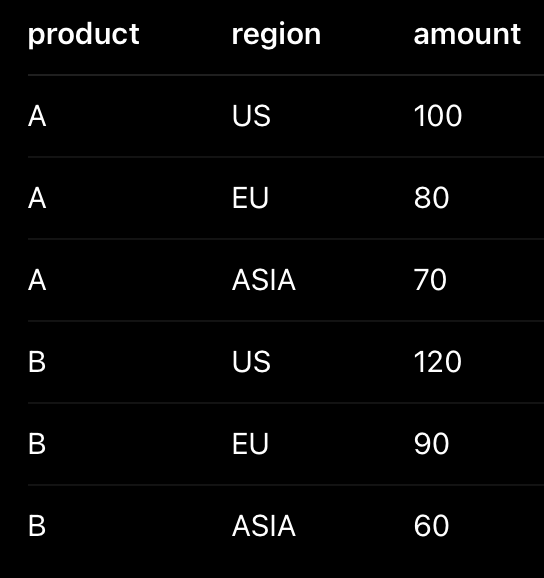 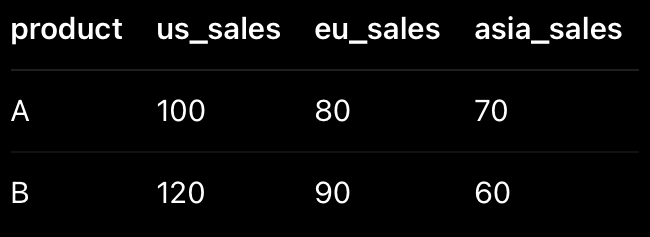 테이블의 행을 열로 바꾸는 것이 pivot 이고, 열을 행으로 바꾸는 것이 unpivot 위 두 테이블이 pivot 과 unpivot 한 상태임 SELECT product SUM(CASE WHEN region = 'US' THEN amount ELSE 0 END) as 'us_sales', SUM(CASE WHEN region = 'EU' THEN amount ELSE 0 END) as 'eu_sales', SUM(CASE WHEN region = 'ASIA' THEN amount ELSE 0 END) as 'asia_sales' FROM table GROUP BY product SELECT product, 'US' as region, us_sales as amount FROM table UNION ALL SELECT product 'EU' as region, eu_sales as amount FROM table UNION ALL SELECT product 'ASIA' as region, asia_sales as amount FROM table |
| What does EXPLAIN or EXPLAIN ANALYZE do in SQL? |
Explain : 쿼리가 어떻게 실행될지 설명하는 실행계획을 예측하여 보여줌 (쿼리 실행 안 함) EXPLAIN SELECT * FROM orders WHERE user_id = 123; Explain Analyze : 실제 쿼리를 실행한 뒤 실행 계획과 성능 정보를 함께 제공 EXPLAIN ANALYZE SELECT * FROM orders WHERE user_id = 123; 쿼리 성능 튜닝을 위해서 사용되거나, 인덱스 사용 여부 확인을 위해 사용됨 |
| How would you optimize a slow-running SQL query with multiple joins? |
join 이 많은 쿼리는 데이터 양, 조인 순서, 인덱스 여부 등을 확인하여 튜닝함 먼저 EXPLAIN 을 사용하여 실행 계획을 분석, 프로파일링 할 수 있음 full scan 여부, Join 방식(굳이 full outer 를 사용해야하나? 등) 등을 확인 join 진행시 불필요한 데이터가 포함되지 않게, 필요한 컬럼만 select 하도록 함 또한 where 조건을 사용하여 필요한 row 만 필터링 되도록 함 CTE, 서브쿼리로 데이터를 줄일 수 있다면 더욱 좋음 join 조건에 걸리는 컬럼에 인덱스를 추가 이외에도 group by, order by 등의 컬럼에도 인덱스 추가
|
| What's the difference between HAVING and WHERE? |
where 는 일반적인 쿼리문에서 값을 필터링하는 조건문 having 은 group by 로 묶인 데이터 번들을 필터링하는 조건문 |
| What’s the best way to calculate a moving average in SQL? Write a query to calculate the rolling average of sales for the past 7 days. |
rolling, moving window 란, 시간에 따라 계속 슬라이딩되면서 계산되는 집계 방식 지금 시점 기준으로, 일정 기간의 데이터만 계속 잘라서 그 구간 안에서 합계, 평균, 최댓값 등을 계산하는 기법임 아래는 7일 이동 평균(7-day Moving Average) 을 구하는 예제 쿼리 SELECT date, visitors, AVG(visitors) OVER ( ORDER BY date ROWS BETWEEN 6 PRECEDING AND CURRENT ROW ) AS moving_avg_7d FROM daily_visitors; 여기서 rows between '6 preceding' and 'current row' 는 현재 row를 포함하여 총 7개의 row 를 묶어 하나의 윈도우로 취급한다는 의미 |
또 다른 예 마지막 7일간 신규 주문 수 SELECT order_date, COUNT(*) OVER ( ORDER BY order_date RANGE BETWEEN INTERVAL '6 days' PRECEDING AND CURRENT DATE ) AS rolling_7d_order_count FROM orders; 여기서는 range 가 사용되었음 rows 와 range 는 아래와 같은 차이가 존재 ROWS: 물리적인 행의 개수를 기준으로 범위(윈도우)를 정함. 값이 같아도 행 번호가 다르면 별개로 취급. RANGE: 값의 범위(차이)를 기준으로 윈도우를 정함. 만약 같은 날짜에 데이터가 여러 개 있다면 RANGE는 그 날짜의 모든 데이터를 한꺼번에 처리함 예를 들어, 오늘은 3월 6일이고, 아래와 같은 데이터가 있다고 하자 date : val 3월 1일 : 1 3월 5일 : 1 3월 5일 : 1 3월 5일 : 1 3월 5일 : 1 3월 6일 : 1 sum(val) over (order by date rows between 2 preceding and current row) 는 3월 6일, 3월 5일, 3월 5일의 합산으로, 결과는 3이 됨 sum(val) over (order by date range between interval '2 days' preceding and current date) 는 3월 6일, 그리고 모든 3월 5일의 합산으로, 결과는 5가 됨  |
첫 번째 행부터 현재 행까지의 모든 값을 더하는 예 SELECT date, visitors, SUM(visitors) OVER ( ORDER BY date ROWS BETWEEN UNBOUNDED PRECEDING AND CURRENT ROW ) AS cumulative_visitors FROM daily_visitors; 여기서 UNBOUNDED 란, 윈도우의 시작부분이 열려있음을 의미함 즉, 시작 날짜(첫번째 행)부터 현재까지 모든 rows 를 윈도우로 고려하겠다는 의미 |
앞뒤 범위를 포함한 중앙 이동 평균 (Centered Moving Average) 현재 행을 기준으로 앞 1행, 뒤 1행 (총 3행)의 평균을 구함 SELECT date, visitors, AVG(visitors) OVER ( ORDER BY date ROWS BETWEEN 1 PRECEDING AND 1 FOLLOWING ) AS centered_3d_avg FROM daily_visitors; |
최근 3일 내 최대 방문자 수 (Rolling Max) 현재 행 포함하여 최근 3일 중 가장 높은 방문자 수를 찾기 SELECT date, visitors, MAX(visitors) OVER ( ORDER BY date ROWS BETWEEN 2 PRECEDING AND CURRENT ROW ) AS max_visitors_3d FROM daily_visitors; |
특정 데이터 제외 (미래 데이터만 보기) 현재 행 바로 다음(1 FOLLOWING)부터 끝(UNBOUNDED FOLLOWING)까지의 합 SELECT date, visitors, SUM(visitors) OVER ( ORDER BY date ROWS BETWEEN 1 FOLLOWING AND UNBOUNDED FOLLOWING ) AS future_total_sum FROM daily_visitors; |
| Write a query to find the top 3 customers by revenue in each region. |
with top as (select *, dense_rank() over (partition by region order by revenue desc) as ds from table) select * from top where ds <= 3 |
| 재귀 함수를 사용하여, 2020년부터 2030년까지 dimension table 을 만드는 쿼리 |
INSERT INTO dim_date WITH RECURSIVE DateSequence AS ( -- 시작 날짜 설정 SELECT CAST('2020-01-01' AS DATE) AS date_val UNION ALL -- 종료 날짜 설정 (2030-12-31까지) SELECT date_val + INTERVAL '1' DAY FROM DateSequence WHERE date_val < CAST('2030-12-31' AS DATE) ) SELECT TO_CHAR(date_val, 'YYYYMMDD')::INT AS date_key, date_val AS full_date, EXTRACT(YEAR FROM date_val) AS year, EXTRACT(QUARTER FROM date_val) AS quarter, EXTRACT(MONTH FROM date_val) AS month, TO_CHAR(date_val, 'Month') AS month_name, EXTRACT(DAY FROM date_val) AS day_of_month, EXTRACT(DOW FROM date_val) + 1 AS day_of_week, -- 0~6을 1~7로 변환 TO_CHAR(date_val, 'Day') AS day_name, CASE WHEN EXTRACT(DOW FROM date_val) IN (0, 6) THEN TRUE ELSE FALSE END AS is_weekend FROM DateSequence; |
참고로 스키마는 다음과 같음 CREATE TABLE dim_date ( date_key INT NOT NULL PRIMARY KEY, -- 고유키 (예: 20230101) full_date DATE NOT NULL, -- 실제 날짜 (YYYY-MM-DD) year INT NOT NULL, -- 연도 quarter INT NOT NULL, -- 분기 month INT NOT NULL, -- 월 (1~12) month_name VARCHAR(15) NOT NULL, -- 월 이름 (January, 1월 등) day_of_month INT NOT NULL, -- 일 (1~31) day_of_week INT NOT NULL, -- 요일 (1=일, 7=토) day_name VARCHAR(15) NOT NULL, -- 요일 이름 (Monday, 월요일 등) is_weekend BOOLEAN NOT NULL -- 주말 여부 ); |
| How do CTEs (Common Table Expressions) help in writing better SQL? |
Common Table Expressions 는 with as 명령어로 만들어진 임시 테이블을 말 함 사람이 읽기에 보기 좋고(readability 향상), 작성 의도 파악이 쉽고, 동일한 로직을 중복 작성하지 않도록 도와줌 윈도우 함수를 사용할 때 자주 사용됨 서브쿼리와 동일한 퍼포먼스를 보이기 때문에 서브쿼리와 비교하여 성능적 향상은 없음 |
| What is a correlated subquery, and how is it different from a regular subquery? |
regular subquery : (서브쿼리를 감싸는) 바깥 쿼리와 독립적으로 실행되는 서브쿼리 바깥 쿼리의 컬럼을 참조하지 않으며, 서브쿼리는 단 한 번만 실행됨 correlated subquery : (서브쿼리를 감싸는) 바깥 쿼리의 컬럼을 참조하는 서브쿼리 outer query 없이 실행이 불가.... outer query 의 각 row 마다 서브 쿼리가 반복 실행(!) 그래서 performance overhead 가 생길 수 있음 예를 들어, SELECT e.name, e.department, e.salary FROM employees e WHERE e.salary > ( SELECT AVG(salary) FROM employees WHERE department = e.department ); employees 의 각 row 마다 반복적으로 서브쿼리가 실행됨..... |
| How would you compare performance between a JOIN and a UNION? |
JOIN combines columns horizontally based on a condition, while UNION combines rows vertically and requires schema compatibility. JOIN and UNION serve different purposes, so can't compare them. |
| What is DDL and DML? |
DDL : Data Definition Language CREATE DATABASE mydatabase; CREATE TABLE mytable; CREATE VIEW myview; CREATE INDEX myindex ON mytable (mycolumn); ALTER TABLE mytable ADD mycolumn string; ALTER TABLE mytable MODIFY mycolumn string; ALTER TABLE mytable DROP COLUMN mycolumn; ALTER TABLE mytable RENAME TO mynewtable; DROP DATABASE mydatabase; DROP TABLE mytable; |
DML : Data Manipulation Language INSERT INTO mytable (name, sex) VALUES ('eyeballs', 'male'); SELECT * FROM mytable WHERE name = 'eyeballs'; UPDATE mytable SET name = 'eyeballs', age = 20 WHERE sex = 'male'; DELETE FROM mytable WHERE name = 'eyeballs'; |
| What’s the difference between DELETE, TRUNCATE, and DROP? |
delete 는 조건에 맞는 레코드(row)를 삭제하는 명령어 로그가 많이 남기 때문에 상대적으로 느림 truncate 는 테이블의 모든 row 삭제하는 명령어 (row 만 삭제하고 테이블은 그대로 존재) delete 와 다르게 where 를 사용할 수 없음 로그가 거의 남지 않아 delete 보다 빠름 drop 은 테이블, 데이터베이스 등을 삭제하는 명령어 |
| How do indexes improve performance? When might they hurt it? |
index 가 적용된 컬럼으로 쿼리를 실행하면 전체 검색을 하지 않고도 찾을 수 있어서 검색 효율이 굉장히 좋아짐 하지만 indexing 된 컬럼의 정보를 저장해야하므로 storage space 를 소모하며 데이터 수정 작업 (insert, update, delete) 퍼포먼스에 악영향을 줌 |
| How can you rank users based on their total purchase value in descending order? |
WITH user_totals AS ( SELECT user_id, SUM(purchase_amount) AS total_purchase FROM purchases GROUP BY user_id ) SELECT user_id, total_purchase, RANK() OVER (ORDER BY total_purchase DESC) AS user_rank FROM user_totals; |
| Explain the concept of CASE statements with an example. |
select CASE WHEN score >=90 THEN 'A', WHEN score >= 80 THEN 'B' ELSE 'C' END as grade |
| Write a query to count the number of unique users by day. |
SELECT DATE(event_time) AS event_date, COUNT(DISTINCT user_id) AS unique_users FROM user_events GROUP BY DATE(event_time) ORDER BY event_date; |
| How would you calculate a cumulative sum of a column? |
SELECT *, SUM(amount) OVER (ORDER BY date) AS acc FROM table; https://eyeballs.tistory.com/m/375 |
| Write a query to identify the first and last transaction of each user. |
with first_last as ( select user, rank() over (partition by user order by date asc) as first, rank() over (partition by user order by date desc) as last from table ) select user from first_last where first = 1 or last = 1 |
| How would you handle missing values in SQL? |
missing values 은 주로 null 을 의미하는데 여기서 null 값을 어떻게 처리하느냐는 비즈니스 의미, 목적에 따라 달라짐 대부분의 집계 함수(sum, avg, count) 는 기본적으로 null 값을 자동으로 제외함 - null 값을 다른 값, 예를 들어 '' 혹은 0 등으로 대체할 수 있음 (select coalesce(c, 0) as c from table) - null 값을 갖는 레코드를 무시할 수 있음 (where c is null) - case when 을 사용하여 null 값이 오면 다르게 처리 할 수 있음 - count(col) 은 null 을 제외하지만, count(*) 은 null 을 포함하므로 null 차이를 눈으로 확인 가능 Removal: Simply remove rows or columns with missing data if they are not significant Imputation: Fill missing values with statistical measures (mean, median) or use more sophisticated methods like KNN imputation. Indicator variable: Add an indicator variable to specify which values were missing Model-based imputation: Use predictive modeling to estimate missing values Handling missing data is essential for maintaining data integrity. Common approaches include:
|
| how would you clean a dataset with inconsistent formats (e.g., date or string issues) |
포맷이 어긋난 데이터의 포맷을 맞추는 작업 날짜의 경우 SELECT CAST(date_string AS DATE) AS standardized_date FROM raw_data; SELECT DATE_PARSE(date_string, '%Y/%m/%d') AS standardized_date FROM raw_data; 문자열의 경우 SELECT UPPER(TRIM(name)) AS clean_name FROM users; |
| Write a query to calculate the time difference between consecutive events for each user. |
SELECT user_id, event_time, event_time - LAG(event_time) OVER (PARTITION BY user_id ORDER BY event_time ) AS time_diff FROM user_events ORDER BY user_id, event_time; 여기서 event_time - LAG(event_time) 에서 사용되는 lag 는 행 단위로 계산하는 윈도우함수이기 때문에 앞의 event_time 을 따로 정렬하지 않아도 알아서 lag 의도대로 계산됨 |
| Can you create a simple temporary function and use it in an SQL query? |
CREATE TEMPORARY FUNCTION get_gender(type VARCHAR) RETURNS VARCHAR AS ( CASE WHEN type = "M" THEN "male" WHEN type = "F" THEN "female" ELSE "n/a" END ); SELECT name, get_gender(type) AS gender FROM class; |
| How do you add subtotals in SQL? |
Adding subtotals can be achieved using the GROUP BY and ROLLUP() functions SELECT department, product, SUM(sales) AS total_sales FROM sales_data GROUP BY ROLLUP(department, product); |
| 두 쿼리의 결과 차이? SELECT * FROM A WHERE col IN (SELECT col FROM B); SELECT * FROM A WHERE col IN (SELECT DISTINCT col FROM B); |
distinct 상관 없이 in 이 있기 때문에 결과는 같을 것 가능하다면, IN 보다 EXISTS 를 사용하는 편이 좋다고 함. 성능적인 면에서, null 영향을 피하는 면에서 참고로 WHERE col IN (null) 에서 where 의 결과는 unknown 이기 때문에 false 가 되어 모든 결과값이 없는 결론 (where 는 true 값만 필터링함. false 나 unknown 은 통과시키지 않음) 설령 col 에 null 이 포함되어 있어도 (null IN (null)) 결과는 false가 됨 null 은 비교 불가능한 상태이기 때문 null 을 찾으려면 col is null 을 사용해야 함 |
| IN 과 exists 의 null 처리 방식 |
where num IN(2, null) : num = 2 or num = null num 이 2라면 true 가 나오지만, null도 역시 비교가 됨 null과 비교한 결과는 unknown이 나오는데 이것 때문에 "num IN(2, null)" 자체가 unknown 이 되어버림 where unknown 은 false 로 처리됨 where num NOT IN(2, null) : num !=2 and num != null 위 이유와 동일하게 num != null 때문에 unknown이 발생하며 "num NOT IN(2,null)" 자체가 unknown 이 되어버림 따라서, in 을 사용 할 때는 null 값을 미리 제거하고 사용해야 함 where num IN(select n from t where n is not null) SELECT column_name(s) FROM table_name WHERE EXISTS (SELECT column_name FROM table_name WHERE condition); 위와 같이 EXISTS 는 행 존재 여부를 판단하기 때문에 null 을 무시함 in 처럼 null 을 미리 처리하지 않아도 괜찮음 |
| 다음 쿼리가 느린 이유를 설명하고, 어떻게 튜닝하겠는가? 컬럼에 연산을 하면 index 타지 않는다는 것이 힌트 SELECT * FROM orders WHERE amount * 1.1 > 100; |
인덱스는 컬럼의 원본 값을 기준으로 구성되어있기 때문에 amount*1.1 처럼 연산을 추가하면 인덱스를 사용할 수 없어서 full scan 이 발생함 따라서 컬럼을 그대로 사용할 수 있도록 연산을 이동하는 등의 작업이 필요 SELECT * FROM orders WHERE amount > 100 / 1.1; |
| covering index란 무엇인가? 언제 사용하면 좋은가? |
covering index 란, 쿼리에서 필요한 모든 컬럼을 인덱스만으로 처리할 수 있는 인덱스를 의미함 즉, 테이블 접근 없이! 인덱스 내 데이터만 스캔(사용)하여 쿼리할 수 있음 아래처럼 index 를 만든 상황에서 CREATE INDEX idx_orders_customer_cover ON orders (customer_id, order_id, amount); 아래 쿼리를 실행하면 인덱스만 가져와서 결과를 도출할 수 있음 SELECT order_id, amount FROM orders WHERE customer_id = 10; 자주 실행되는 조회 쿼리, 읽기 비중이 높은 테이블, 네트워크 IO 가 병목인 경우에 사용하면 좋음 그러니까 covering index 이 될 수 있도록 필요한 컬럼들에 index 을 추가한다는 말이구나 |
| COUNT(*)와 COUNT(column)의 차이? 인덱스 영향을 받는가? |
count(*) 은 null 까지 포함하여 계산 count(column) 은 null 을 제외하여 계산 인덱스가 존재하면, 테이블 대신 인덱스를 스캔하여 더 빠르게 쿼리할 수 있음 |
| 고객 테이블과 주문 테이블이 있을 때, ‘한 번도 주문하지 않은 고객’을 찾는 SQL을 작성하라 |
select c.name from orders o right join customers c on o.name = c.name where o.name is null |
select name from customers where name not in (select distinct name from orders) |
| 유저별로 첫 구매(first purchase)를 찾는 SQL |
select id, min(date) from users group by id |
row_number() over(partitioned by id order by date) |
| 중복 이메일을 가진 유저를 모두 찾는 SQL |
select email, count(1) from users group by email having count(1)>1 |
| 파티션된 테이블(year, month, day)에서 최근 하루 데이터를 가져오는 SQL을 작성하라 |
SELECT * FROM events WHERE (year, month, day) = ( SELECT year, month, day FROM events ORDER BY year DESC, month DESC, day DESC LIMIT 1 ); where (a,b,c) = (a, b, c) 이런식으로 조건비교가 가능하구나 |
| event 로그에서 ‘DAU (Daily Active User)’ 구하는 SQL |
select date(dt), count(distinct(userid)) from table group by date(dt) |
| 지난 7일간 유저별 session 수 계산 |
select user_id, count(*) as session_count from table where session_date >= CURRENT_DATE - INTERVAL '7' DAY group by user_id; |
| 로그 테이블에서 이벤트 A 이후 5분 안에 이벤트 B를 발생시킨 유저 수 구하기 |
SELECT COUNT(DISTINCT a.user_id) AS user_cnt FROM event_logs a JOIN event_logs b ON a.user_id = b.user_id AND a.event_type = 'A' AND b.event_type = 'B' AND b.event_time BETWEEN a.event_time AND a.event_time + INTERVAL '5' MINUTE; |
| CHAR, VARCHAR 차이는? |
CHAR 는 고정 길이 VARCHAR 는 가변 길이를 사용하기 때문에 길이가 고정되어 있는 문자열을 표현할 때 CHAR, 길이가 불규칙한 문자열을 표현할 때 VARCHAR 사용 CHAR 에서 부족한 길이는 공백으로 패딩하지만(공간 낭비) VARCHAR 에서는 부족한 공간이 없음 CHAR 는 길이가 고정되어있으므로 쿼리 실행이 안정적이고 빠름 VARCHAR 는 길이가 고정되어있지 않아 쿼리 실행시 캐스팅 등의 추가 비용이 발생 |
| VARCHAR(max) 사용 시 문제점은? |
varchar(max) 는 full index 생성이 불가하여 검색 성능이 떨어짐 내부 비교 연산 진행시, varchar(max) 에 담긴 데이터를 캐스팅하는 추가 작업이 있어서 오버헤드로 작용한다고 함 |
| S3에서 Parquet과 ORC의 차이? 언제 사용? |
둘 다 columnar storage format 이라 컬럼 읽기에 특화되어 있고, 압축 효율이 좋으며 공간 차지도 덜 함 Parquet 은 Spark, Hive, Athena, Presto, Redshift 등과의 호환성이 대단히 좋음 업계 표준 Nested data 구조(json) 를 지원함 Spark, Athena, Glue ETL 등의 기본 선택 포맷임 Orc 는 Hive 기반 시스템에 최적화 되어있음 (presto, Tez) 따라서 Hive 를 사용할 때 선택하는 포맷임 parquet 보다 압축률이 좋음 |
| Redshift Spectrum (External Table) 의 장단점은? |
Spectrum 은 s3 에 있는 데이터를 external table 형태로 직접 쿼리하는 기능 s3 는 무한대로 확장 가능하여 저장 공간 이슈가 없음 spectrum 작업 자체는 redshift 가 아닌 외부(s3) 애서 처리되기 때문에 클러스터 성능에 영향을 덜 줌 무슨 말이냐면, redshift 클러스터의 compute node 가 s3 데이터를 읽는 게 아니고 redshift 외부의 별도로 존재하는 spectrum worker 인프라가 s3 데이터를 읽고 처리한다는 말임 (s3 -> redshift compute node 로 직접 들어오는 게 아니라 s3 -> spectrum worker(serverless) -> redshift 로 들어옴) 이 외부 spectrum workers 는 s3 데이터를 읽고, 프루닝하고 , 필터링하고, 프로젝션하는 등의 전처리 과정을 진행하고 결과만 redshift 로 보내어 compute nodes 가 작업할 수 있도록 도와줌 spectrum 사용시, Glue Data Catalog 를 재사용 가능 하지만 S3 에서 읽어와야 하는 만큼 네트워크 IO 오버헤드가 발생 DML(update, delete 등) 의 기능이 거의 없음 |
| WHERE col = NULL이 왜 작동하지 않는가? |
NULL 비교는 IS NULL 사용해야 하기 때문 |
| DISTINCT 와 GROUP BY 중 어느 게 더 빠른가? 이유는? |
distinct 가 더 빠름 distinct 는 중복 제거만 수행하지만 groupby 는 중복 제거에 집계 준비 과정까지 진행하기 때문 (집계 함수 수행을 위한 구조를 생성해 두는 작업) |
| 실수를 표현하는 세 가지 타입 |
decimal : 높은 정확성, 낮은 처리 속도. 정밀한 숫자 계산에 필요. 주로 돈 정보를 넣는다고 함. double : 실수를 표현할 때 일반적으로 사용함. float : 낮은 정확성, 높은 처리 속도 |
| 날짜를 표현하는 세 가지 타입 |
date : 날짜 정보만 표현 datetime : 날짜 + 시간 정보 표현 timestamp : 날짜 + 시간 + timezone 표현. 주로 timestamp 를 많이 사용함 |
| count(1) 과 count(*) 의 차이 |
성능 차이는 없음 많은 DB 에서 count(*) 실행 성능 최적화가 되었기 때문 |
| Min 과 Order By limit 1 의 차이 |
| https://eyeballs.tistory.com/m/463 |
| SELECT 1 vs SELECT TRUE |
select 1 은 int 리터럴, select true 는 boolean 리터럴을 반환함 둘 다 exists 서브쿼리에서 사용 가능함 |
'Coding Interview' 카테고리의 다른 글
| [Data Engineer] interview questions (0) | 2026.01.16 |
|---|---|
| [Airflow] interview questions (0) | 2025.12.14 |
| [Canada] 내가 찾아본, 채용 공고 확인하는 곳들 (0) | 2025.10.01 |
| [IT] Data Engineer 기술 인터뷰 준비를 위한 이론 + English (0) | 2025.08.20 |
| [leetcode] 584. Find Customer Referee (0) | 2025.05.20 |